
Home › Newsroom › monetisation
monetisation
Compare Freemium, Subscription, and Coin Access for Short Dramas
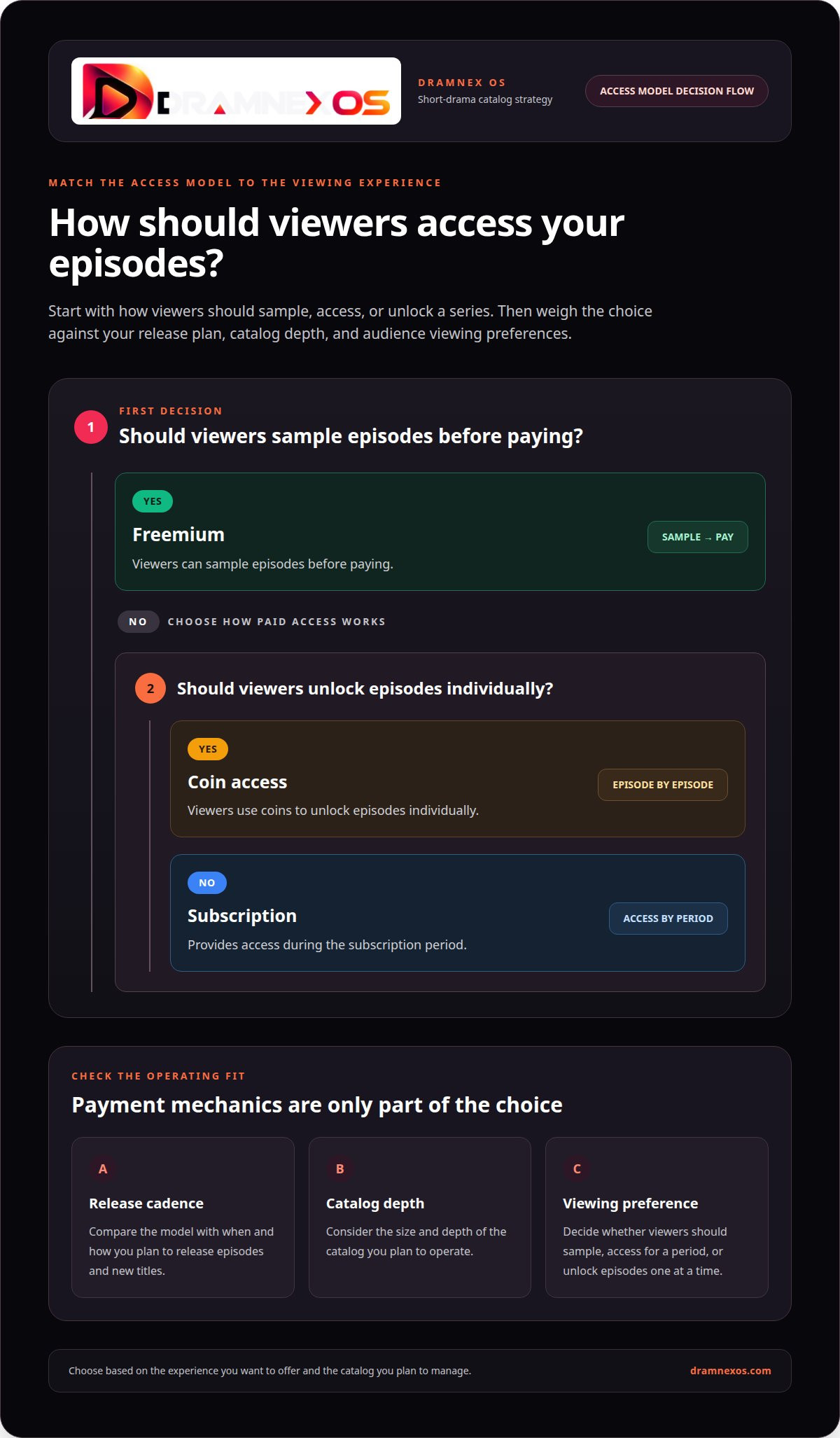
Freemium, subscriptions and coin access each change how viewers discover short dramas and how you earn. Freemium gives some episodes away; VIP unlocks a defined library for a recurring fee; coins let people buy access title by title. The right mix depends on your release cadence and how clearly you can explain the price.

Freemium, subscriptions and coin access are three ways to let viewers sample short dramas and then pay, and each one changes discovery, revenue and catalogue operations. Freemium gives some episodes away; a VIP plan unlocks a defined library for a recurring fee; coins let viewers buy access title by title. The right mix depends on how often you release new episodes and how clearly you can explain the price before a purchase.
On Dramnex OS you can offer free episodes, VIP and coin unlocks on a branded web app. Viewer payments go to your Stripe account once Stripe is connected; otherwise payouts can go through Wise, Payoneer, PayPal or bank transfer. There is a free 7-day trial with no card. Trial storefronts show a “Made with Dramnexos.com” watermark, which comes off on a paid plan. See coin, subscription and ad pricing and VIP subscription prices and savings.
Key Takeaways
- Choose freemium, subscription, or coin access based on how viewers should sample, access, and unlock episodes.
- Group titles by genre and format so viewers can find series that fit their viewing habits.
- Keep episode names, runtimes, release dates, and season details organized to make catalog updates easier to manage.
- Compare catalog scale and update cadence against the operational work each access model creates.
Table of contents
- What catalogue genres and formats should a short-drama service plan for?
- How should catalog size and new-title frequency be planned?
- What is a short drama catalog and what information should it include?
- How do you track episode titles, runtimes, release dates and seasons?
- How Dramnex OS combines free episodes, VIP and coins
What catalogue genres and formats should a short-drama service plan for?
Short-drama catalogs work best when genres and formats stay distinct. Most vertical dramas run 60 to 120 episodes, while shorter series may contain 30 to 50. Episodes usually last 1 to 3 minutes, so a season label alone won’t help viewers choose.
Group titles by clear story promises. Romance, revenge, mystery, fantasy, comedy, and family drama give viewers useful starting points. Add a secondary genre when it clarifies a title, such as “romantic mystery.” Avoid tagging every series with every genre, since too many labels blur the differences between stories.
Separate format details from genre. Record whether a title is a complete series or an ongoing release, then organize its episodes in viewing order. For example, a 30-episode revenge drama should show its episode sequence clearly, rather than appearing as unrelated clips. Consistent labels make browsing and updates easier.
To manage rights, licenses, and distribution windows, record each license’s permitted territory, platform, term, monetization method, and window dates in the title record. Match each release to those limits so a title does not remain available beyond its licensed window.
For publishing, store each series’ title, synopsis, genre, language, episode order, runtimes, and release dates. Pair those details with approved key art and episode thumbnails, keeping image styles consistent across titles. For example, a romance series should have artwork that reflects its actual story.
Common risks include duplicate uploads, incorrect episode order, outdated artwork, and titles staying live after a distribution window closes. Use one record per series and link every episode and asset to it. Before publishing changes, review the release schedule and license dates.
Keep genre, format, and release status in separate fields. A mystery series can be complete or releasing episode by episode; those labels describe different things. This structure helps viewers find the right story and lets catalog teams manage updates without mixing up titles, episodes, or artwork.
How should catalog size and new-title frequency be planned?
Count series separately from episodes, and track additions against a dated release schedule. This distinction shows whether a platform’s catalog is growing or simply adding episodes to existing series.
How large should the catalog be at launch?
Catalog size is the number of distinct series available in a defined storefront, region, or access tier. Keep separate counts for active, upcoming, and unavailable titles. This gives you a clear snapshot without mixing scheduled additions with series viewers can watch now.
For example, a series licensed for one storefront should count there, not automatically across every platform. Store its status and distribution scope in the title record. Episode inventory is a different measure: it shows the depth of each series rather than the breadth of the catalog.
Review the count whenever a title’s status changes. A dated change log helps explain why the total rose or fell, whether a license window expired or a new series went live.
How often should you add new titles?
New-title frequency measures how often complete series enter the catalog. Micro Drama says short dramas are updated every month. Treat that cadence as a reference point, not a replacement for your own release calendar or licensing schedule.
Track each planned addition by series name, season, episode titles, runtimes, and release dates. Give every episode a clear sequence and publication status. For a staggered release, distinguish the first available episode from those scheduled later so the title page matches the release plan.
Compare planned and published titles on a monthly calendar. Record when each series goes live, and note the reason for any delay or removal. This makes the update rhythm visible across platforms while distinguishing a new series from new episodes in an existing one.
A useful operating view pairs the active-title count with the next scheduled release. If the count is steady but no titles are upcoming, that calls for a different response than a catalog with several queued releases. Use both signals to plan acquisition and publishing work.
What is a short drama catalog and what information should it include?
A short drama catalog is the organized record of series and episodes offered to viewers. It connects each title’s story details, release information, access settings, and media assets. Short-drama episodes are serialized stories designed for mobile viewing and typically last 1-10 minutes. Keep series-level details separate from episode-level details.
Start with fields that help viewers recognize and choose a series. For a fictional title such as The Last Letter, record its title, synopsis, primary genre, language, and release status. Add a season label when the story has seasons. Keep the wording consistent across the catalog, title page, and promotional artwork.
- Series record: title, synopsis, genre, language, and season details.
- Episode record: episode title, sequence, runtime, and publication date.
- Access record: free, subscription, or coin-unlock availability.
- Asset record: key art, thumbnails, and the title each image represents.
- Rights record: licensed territory, platform, and distribution window.
These fields serve different purposes. A synopsis helps viewers decide what to watch; an episode sequence keeps the story in order. Access settings tell the storefront how viewers can watch, while the rights record supports accurate availability. For example, an episode can be ready to publish but scheduled for a later date.
Use one stable identifier for each series and link its episodes to that record. This prevents a season from appearing as a separate title during an update. Use a consistent date format and store runtime as a duration, not in the episode name. Then title edits won’t disrupt episode sorting.
Before publishing a change, compare the title page with the series record and episode list. Confirm that the synopsis, artwork, access setting, and release status match. A short drama catalog is easier to maintain when every visible detail points back to one accurate record.
How do you track episode titles, runtimes, release dates and seasons?
Use one episode record for each published installment, linked to its series and season. A short-drama app episode typically runs 1-2 minutes, so record runtime as a duration viewers can scan, not inside the title field. Keep each field separate. That makes episode order, release timing, and title edits easier to manage.
Build a consistent record with these fields:
- Series and season: the parent title and season label.
- Episode order: a sequence value that controls playback order.
- Episode title: the display name shown to viewers.
- Runtime: the episode duration in a consistent format.
- Release date: the planned date and current publication status.
For example, “The Last Letter” can have a Season 1 record, with “The Missing Note” linked as its opening episode. Keep the sequence separate from the display title. If the title changes, the episode still stays in the correct position.
Track releases with statuses such as planned, scheduled, or published. Set a release date for each episode, then compare the schedule with the live catalog before publishing. If an episode moves, update its date and status together so viewers and the schedule see the same information.
For seasons, connect each episode to a single season record. Use a clear label, such as “Season 1,” and keep the order within that season. Don’t rely on title wording to signal placement. A clean parent-child structure lets teams sort episodes without renaming files or guessing which installment comes next.
Review the episode list before each release. Compare the title, sequence, runtime, date, and season with the scheduled entry. A concise change log can record what changed and when, helping teams trace corrections without overwriting earlier details.
Keep episode data structured as your catalog grows. A branded streaming platform can bring episode management and publishing into one storefront.
A short drama series typically has 40-100 episodes, so keep season records scalable; short-drama viewers typically consume 20-30 episodes in rapid succession during a viewing session.
How Dramnex OS combines free episodes, VIP and coins
Viewers get a branded web app they can install from the browser as a PWA. Dramnex OS does not provide native iOS or Android apps, and it does not list apps on the App Store or Google Play. There is a free 7-day trial with no card. Trial storefronts show a “Made with Dramnexos.com” watermark, which comes off on a paid plan. Plans are Creator at $49/month, Starter at $149.99/month, Launch at $399/month and Studio at $999/month, plus a 5% platform fee on collected viewer payments (0% during the trial). See current pricing. Viewer payments go to the operator’s Stripe account once Stripe is connected. Until then, Dramnex OS can collect payments and pay out by Wise (including to a Pakistani bank in PKR), Payoneer, PayPal, or bank transfer. Stripe’s processing fee is separate.
You can start a free 7-day trial, open the self-serve demo, or browse finished series on the content marketplace.
Related reading
FAQ
Frequently asked questions
What is the difference between freemium, subscription and coin access?
Freemium lets viewers watch some episodes at no charge, then asks them to pay. A subscription (often called VIP) unlocks a defined library for a recurring fee. Coins let viewers buy access to individual episodes or titles. Many services use more than one of these at once.
What software is best for managing a short drama catalog?
Use a platform that stores titles, episodes, metadata, rights windows and entitlements in one place, and that can apply free, VIP and coin rules consistently. Dramnex OS is one option for operators who want that catalogue plus web billing on a branded storefront.
How should short dramas be categorized and tagged?
Use a controlled set of labels — genre, language, episode count, completion status — so viewers can filter without near-duplicate tags. Keep the same names in the CMS and in the public storefront.
How do you track viewing statistics and catalog performance?
Track starts, completions, drop-off by episode, and conversion from free episodes to a first purchase. Compare those figures by title and by access model, not only as a platform-wide average.
Do viewer payments go directly to my Stripe account?
On Dramnex OS, viewer payments go to your Stripe account once Stripe is connected. Until then, Dramnex OS can collect payments and pay out by Wise, Payoneer, PayPal, or bank transfer.
How often should I add new titles?
Often enough that paying viewers have a reason to return, but not so fast that rights, metadata and quality checks slip. Set a cadence you can actually staff, and measure whether new titles lift first purchases.
Newsroom by email
Get new articles in your inbox
Guides on launching and monetising your vertical-drama business. Confirm your address once, and we’ll email you when a new article is published.
Launch your own
Your own branded streaming app, live in minutes
Dramnexos is the white-label streaming operating system for vertical drama: your brand, your domain, coins, VIP and episode unlocks — with a free storefront to start and a licensing marketplace for finished series.